Earn Dollars with Click'n'Earn NOW ! ! ! ! ! !

Showing posts with label Microsoft. Show all posts

Online Free Data storage

There are many sites which offer to store your data online. They have different plans but i'm going to mention only the free storage option. You can these services to back up your important data or to store files.


  • A-Drive
Basic Account holders get 50 GB of free storage, which is accessible through the web interface. Additional storage and services like multiple connections, FTP with timestamp support, WebDAV, and file history recovery are available through paid subscription plans


  • SkyDrive- From Microsoft


SkyDrive is a file storage and sharing service that allows users to upload files, then access them from a web browser. It uses Windows Live ID to control access to the user's files, allowing them to keep the files private, share with contacts, or make the files public. Publicly-shared files do not require a Windows Live ID to access.
The service currently offers 25 GB of free personal storage, with individual files limited to 50 MB Optionally, an ActiveX-based tool can be installed to allow drag-and-drop uploading from Windows Explorer. Up to five files can be uploaded each time if the tool has not been installed. The third party free software "SkyDrive Explorer" can enable SkyDrive as an additional drive in windows systems.


  • i-Drive
The free Basic version allots up to 2GB of storage, and gives you 10GB extra storage just for referring it to five e-mail contacts. So you will get 12GB of storage space

The three sites so far I've mentioned gives you whopping 87GB storage space for FREE!!

There are many sites which gives you little more storage space. Some of them are

If you sign-up to all these services you will get 100GB free storage!

online storage is recommended for those who have unlimited plan and a high-speed internet connection.

Microsoft Revamps MSN Home

Microsoft has setup a new look for its MSN home page. Athough the update is scheduled for a later launch - notably early next year, according to an MSN representative. Microsoft has made available public preview of the redesigned MSN Home page.

The new MSN portal as seen in the preview, debut major upgrades, freshening up the popular destination with social networking tools: integrated Facebook and Twitter feeds.

This latest move by Microsoft is the first step in a systematic process to upgrade the entire MSN network. MSN is making an effort to offer localized content with Local Editions. Local Edition contents such as: weather forecasts, event listings, local sport scores, and traffic updates will serve to leverage its integration with Bing search engine.

Microsoft, however, states that the main purposes of the update are to declutter the MSN homepage and to refresh its outdated look.

Microsoft, Google seal Twitter search deals


SAN FRANCISCO : Microsoft Corp and Google Inc secured separate agreements to access real-time content from Web phenomenon Twitter, intensifying their battle for a search market that Google dominates.

Google, and Microsoft's 5-month-old Bing, each announced deals to access Twitter's store of public data in real time on Wednesday, in the latest sign of escalating competition between the two search engines.The long-expected deals are expected to ramp up the efficacy and lure of search results, by allowing users to scan real-time Tweets: 140-character stream-of-consciousness messages that Twitter hosts on its popular website.

Hours later, Google announced on its company blog its own agreement, promising that Twitter messages, or Tweets, would be incorporated into search results "in the coming months."Both companies would not disclose financial terms. Microsoft also announced a deal to include content from social network Facebook on Wednesday.

Asked about the timing of twin announcements, Google Vice President of Search Products Marissa Mayer told Reuters deals between fast-growing companies like Google and Twitter take a long time to come together."This is not something that happens on the scale of hours, it's something that happens on the scale of months," she said. Google's addition of Twitter data will fill a "critical gap."

"Whenever there's new data that's emerging, and growing as fast as we're seeing with Twitter, it's really about making sure that we have the content so we can search for it and find it for our users."Twitter, the 3-year-old Web start-up that has become an Internet sensation popularized by celebrities and government, attracts tens of millions of visitors every month.

In September, it received a $100 million round of financing that valued the company at $1 billion, according to people familiar with the matter. Twitter has yet to generate significant revenue from its free service, though it has mentioned advertising and premium features as potential ways to make money.

Microsoft plans to present the most popular Tweets of the moment, while allowing Web surfers to view Twitter messages that contain links to other Web content. Microsoft will filter out spam and other extraneous data.Microsoft said data from Facebook would be available in Bing at an unspecified later date. The Facebook deal encompasses only messages that its 300 million-plus users have flagged as viewable to the public, a practice that is relatively new and not as widespread on the social network, where users typically send messages to groups of friends.

Yahoo's chief technology officer, Ari Balogh, told reporters that, generally speaking, any data Microsoft's search engine has access to also would be accessible to Yahoo under the terms of their partnership.Yahoo has been testing the limited inclusion of Twitter messages within search results to certain users, he added."All content on the Web is relevant to search," Balogh said. He thought people would not want to go to three or four sites to access different types of data.

Google widens lead over Bing and Yahoo!: Hitwise


Experian Hitwise on Tuesday reported that Bing and Yahoo! online search engines lost ground in the United States in September while Google inched ahead slightly.

Google handled 71.08 percent of all US Internet searches in the four weeks ending October 3, while Yahoo! and Bing accounted for 16.38 percent and 8.96 percent respectively, according to Hitwise.

Ask.com was the biggest winner, with its share of US searches climbing 8 percent to 2.56 percent in September as compared with August.

Microsoft’s Bing saw its share of the US online search market dip 5 percent in the month-to-month comparison, while the number of searches at Yahoo! was down 3 percent, Hitwise reported.

Google last week rolled out search engine refinements as Microsoft continues an aggressive campaign to lure people to Bing.

The Internet giant’s modifications include tools that let people limit online searches to only serve up results from the past hour, or by specific date ranges.

Google users can choose to be shown search only results from blogs, news, or Web pages that they have visited or those they haven’t visited.

The Bing search engine Microsoft launched in May was designed to intuitively understand what people are seeking on the Internet and challenge online king Google.

The US software colossus described Bing as a “Decision Engine” aimed at online shoppers trying to make buying decisions, plan trips, research health matters or find local businesses.

Bing posted a slight increase in its share of the US search market in August, a third month in a row of modest gains, according to online tracking firm comScore.

Yahoo! and Microsoft, after months of negotiations, unveiled a 10-year Web search and advertising partnership in late July that set the stage for a joint offensive against Google.

Under the agreement, Yahoo! will use Microsoft’s search engine on its own sites while Yahoo! will provide the exclusive global sales force for premium advertisers.

Microsoft is integrating messages from prominent users of wildly popular micro-blogging service Twitter into results generated by Bing.

Microsoft blames phishing for Hotmail security breach

The passwords to more than 10,000 Hotmail accounts have been compromised and posted online, Microsoft confirmed on Monday in what appears to be one of the largest phishing schemes ever.

The huge security breach was first reported by the website neowin.net, which said a list of the account details had been posted last week on pastebin.com, a forum used by software developers.

But while the initial report indicated a security breach at Hotmail’s servers, Microsoft said that the sensitive data most likely emanated from a phishing scheme in which Hotmail users were tricked into entering their information in a bogus site.

“Over the weekend, Microsoft learned that several thousand Windows Live Hotmail customers’ credentials were exposed on a third-party site due to a likely phishing scheme,” Microsoft said in a statement.

“Upon learning of the issue, we immediately requested that the credentials be removed and launched an investigation to determine the impact to customers. As part of that investigation, we determined that this was not a breach of internal Microsoft data and initiated our standard process of working to help customers regain control of their accounts.”

According to Neowin, the list was posted Friday at pastebin.com but has since been taken down. The site said it had seen parts of the list and that the accounts appeared to be genuine and mostly based in Europe. The list detailed accounts starting from A through B, suggesting that additional accounts may also have been compromised.

Exacerbating the threat is the fact that many people use the same log-on information for Hotmail and other online resources offered by Microsoft, which could expose sensitive information. Neowin recommended Hotmail users to change their password and security section immediately.

IT to generate 5.8 million new jobs by 2013


Information technology will be an employment machine, generating 5.8 million new jobs in the coming four years, according to International Data Corporation (IDC) research released on Sunday.

IDC predicts that the IT industry will be an engine powering economies out of economic doldrums, creating more that 75,000 new businesses in the next four years and adding jobs at a rate of 3 percent annually.

“Countries that foster innovation and invest in infrastructure, education and skills development for their citizens will have a major competitive advantage in the global marketplace,” said Microsoft chief executive Steve Ballmer.

“In this fundamental economic reset, innovative technologies will play a vital role in driving productivity gains and enabling the creation of new local businesses and highly skilled jobs that fuel economic recovery and support sustainable economic growth.”

US software colossus Microsoft sponsored the IDC research into the impact of IT in 52 countries that represent 98 percent of the global IT spending.

“IT spending growth is a good sign as we come out of the recession,” Microsoft Corporate Affairs communications manager Scott Selby told AFP.

Employment growth in IT related jobs will be three times that of overall job growth in what Selby said is a “good driver of economic growth.”

While the world has been in the gripes of a recession, it has also been in the midst of a “technology renaissance” flush with advances in software, devices, and Internet-based services, according to IDC.

IDC expects IT spending in the countries studied to grow at slightly more than three percent annually, three times as fast as the gross domestic products between now and the year 2013.

In what is good news for software powerhouse Microsoft, spending on software is predicted to grow faster than overall IT spending, rising 4.8 percent annually.

“Software is a driving force behind this IT growth,” Selby said. “IT allows us to do more with less.”

New technologies are also ushering in a new “cloud computing” paradigm in which applications are provided online as services instead of as software bought and installed on home or office machines, according to IDC.

Money saved by using software as needed “in the cloud” instead of buying, maintaining, and updating applications will likely be devoted to bringing new products or services to market faster and cheaper, according to Selby.

IDC estimates that cloud services could add 800 billion dollars in net new business revenues between the end of 2009 and the end of 2013.

“Over the past 20 years, we’ve seen transformative power in how investments in IT innovations foster economic growth,” said Robert D. Atkinson, founder of the Information Technology and Innovation Foundation in Washington, D.C.

“Continued innovation and investment in information technology will help jump-start recovery from the current recession and will significantly contribute to the growth of employment and new businesses.”

Emerging markets will reap the greatest economic gains from IT, according to Selby.

“Emerging markets are really going to take advantage of IT for years to come,” Selby said.

“One reason is they will be able to leapfrog and enjoy benefits of innovations like cloud computing much more quickly.”

Microsoft played up the prime role its software is playing in IT systems worldwide.

Nintendo


Times have been tough lately in Mario Land. After being stomped on by an oversized cartoon plumber for more than two years, Nintendo’s rivals are doing their best to shrink Super Mario back down to size. The Japanese entertainment company’s decision on Thursday to knock 20 per cent off the price of the Wii, its popular gaming console, came on the heels of price cuts for rival Sony’s PlayStation3 and Microsoft’s Xbox 360.

Along with the prospect of being dragged into a price war, there is plenty else for investors to feel glum about. Sales of the Wii fell 20 per cent in the first half, NPD market research estimates, while Nintendo’s shares have lost a third since January. And, with both Microsoft andSony preparing to launch their own versions of the Wii’s innovative motion-sensitive controls, Nintendo’s advantage in casual gaming risks being competed away.

But hang on. A price cut was inevitable given the number of Wiis already sold. Until this week, its price had been unchanged since the 2006 launch – the longest streak in gaming history.

While sales have fallen sharply, with an installed base of more than 52m consoles and a likely boost to sales ahead of the holiday season, the Wii’s position atop the heap looks secure. Its closest rival is Microsoft, with just over 30m consoles.

Nintendo’s share price already reflects lower growth expectations, having fallen from a peak of about 50 times forward earnings in late 2007, when the Wii was flying off the shelves, to about 10 times today. Nintendo must be hoping that its experience will be something like Sony’s. Meanwhile, US sales of the PS3 jumped 300 per cent after prices dropped last month. That could power-up Nintendo with the extra life it needs.

Microsoft, Google expand search-engine tools

Say you're buying a dog. You know the breed you want; you can picture it in your head. But what was the name? A bull terrier? A pit bull? A bull mastiff ?


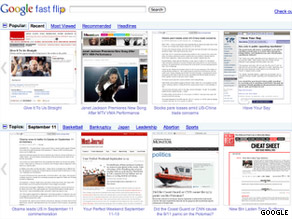
Google's Fast Flip application displays articles as they appear on news or magazine Web sites.

Or what if you're in the market for a new camera? You saw a friend with a credit-card-thin model at a party last weekend. But was that a Canon? A Nikon? A brand you've never heard of?

If you're like many people, you'd turn to the Internet for answers. But you type in "dog breeds" or "digital cameras" into Google and punch enter, and a big list of blue links comes up. You don't see the dog you want. You don't find the camera, either -- at least not quickly.

Such quandaries are the driving force behind Bing's new "visual search" function, which lets Web users troll through image catalogues instead of Web pages when they know what something looks like but can't put their finger on the name.

The examples are also evidence that the search engine market, once dominated by simple rectangular search bars and the lists of Web pages that follow, is diversifying. People who once were happy with a one-search-fits-all model are finding exceptions, and a number of niche search products are trying to respond to these increasingly diverse needs.

Also this week, Google introduced a test product called Fast Flip, which takes a retro look at Web design by making online news look like something magazine readers will find familiar.

The company has other news products -- namely Google Reader and Google News -- but is looking for ways to make news content more visual and to share some of the revenue.

The new products come as Microsoft's Bing continues to elbow for more room in an online search market that Google has dominated for years. In June, 65 percent of all Internet searchers were done through Google sites, according to comScore. Microsoft caught only 8.4 percent of searchers in the same period.

Fast Flip, an experimental feature of Google Labs, is a Web application that allows users to scan news articles from 39 print and online publishers, including The New York Times, Newsweek, TechCrunch and Us magazine.

Users can "flip" through a horizontal stream of screen grabs of articles as they appear on the partners' Web sites, with layout, design and images intact. You can click once on a story to enlarge the page; a second click takes you to the partner's site. Users also can browse popular topics (the economy, Taylor Swift) or search for others of their choosing.

Google says the idea behind the new service is to make online news-browsing faster and replicate the reading experience of flipping through a magazine or newspaper.

Unlike Google News, which emphasizes breaking news articles from the past 24 hours, Fast Flip "is more for stories with a longer shelf life," Google spokesman Chris Gaither said.

"We think there's a lot of room for innovation in how people consume news articles on the Web," Gaither said. "The easier it is for people to browse articles quickly, the more they'll read."

Loren Baker, editor of Search Engine Journal, says that increases in bandwidth make "visual search" functions more successful today than in previous years, when images would load more slowly.

Baker believes that Google Fast Flip could make it easier for people to scan news articles on their netbooks, tablets or even smartphones.

"I don't have to sift through my bookmarks. I don't even have to leave Google," he said. "It's almost like a virtual newsstand on my handheld."

But not everyone is excited about Google's new product.

"If this is the future of news, I think news is kind of screwed," said Frederic Lardinois, a writer at ReadWriteWeb, a technology blog. Lardinois said the interface is backward-thinking and is hard to use.

Fast Flip is in a test phase and will incorporate feedback from users, Gaither said. Google also is seeking to expand the roster of Fast Flip partners, he said.

Some tech observers say Bing's hyper-visual search function gives it a new leg up on Google in terms of functionality.

Nova Spivack, a search expert and founder of Twine, said the most important thing about Bing's visual search is that users can sort the images into categories.

By creating different kinds of searches and making them sortable, Bing is catering to high-end Internet users -- which, soon, will be everyone, he said.

"I think Bing has realized that everybody is becoming a search geek," he said.

On the dog-breed search example, users can filter the images to include only terriers, or hypoallergenic dogs or toy dogs, or dogs that need a medium level of exercise, so they don't have to scroll through hundreds of photos to find the dog they're searching for.

Mary Jo Foley, editor of the All About Microsoft blog at ZDNet, said she personally finds Bing's visual search useless because she's not a visually minded person. But she said it's an example of search engines diversifying, and that's a good thing for everyone.

"I think the idea for Microsoft and Google and Yahoo is to present things in new ways and say, 'What if you could do this? Would you want to do it this way?' "

She added: "Not all people search in the same way, and not all people want to get their results in the same way."

There are about 50 galleries of images in the new Bing visual search bin, but more will be added, and eventually the idea will be integrated into the main search site, said Stefan Weitz, director of Bing. Right now, users have to go to a separate page to find the visual searches.

Microsoft Outlook export options – absent

imageI’ve to use Microsoft Outlook 2007 at work and one of the most irritating things about Outlook is it’s inability to export information. There’s like no flexibility to get information out of it.

Outlook has a great ability to store information and be a contact center piece, but damn if it isn’t hard getting stuff out of it.

There should be more options…

As a standard there should be an export option to every window; whatever your looking at, you should be able to export this to a CSV file or something compatible with something else.

Take for instance doing an advanced search in Outlook; you can do an advanced search in Outlook to try to find what your looking for, and saying you do, now what can you do with it… NOTHING.

imageThe file menu here offers no export option. When you right-click on an item or a group of items there’s no export options; not even a copy option.

Now, while you can’t right-click and copy, there is the ability to CTRL-C and copy form there, but if you paste it in Outlook it’s links/attachments, if you paste it in to Notepad/Wordpad it’s text.

Funny how that works.

And one of my biggest deals with programs that want to store, or keep, information for you is, once it’s in the program, how do you get it out? Can you get it out? If you can, is it compatible or easy to work with once it’s exported; this is where I think Microsoft Outlook fails.

Since I’ve to export or get information out of Outlook regularly, this is a point of friction for me,but I found this little freeware program that helps me quite a bit; it’s called ‘CodeTwo Outlook Export’.

image

The beauty of this program/plug-in is that it adds a toolbar icon to Outlook and you can export/filter information to a CSV file and once exported, it’s more usable.

For Outlook to be such a ‘bionic’ contact manager, it lacks some serious common sense functions.

From the contacts window, there’s not even a way to select multiple contacts and export those to a file; you can’t even select all the contacts and create a group/distribution, send email or option to print label/envelope- these things are completely obvious natural functions and completely missing. You can do it from outside the program, but not in it [not easily].

I hope this helps someone.

Thanks for reading!

Enjoy.

Windows 7 deals with the pain of Windows XP


The new Windows operating system (OS), out in the shops on October 22, will be the biggest-selling OS ever.


This is no great prediction since all new PCs will come with Windows 7 installed in a matter of weeks. But this time Microsoft has to make up for the shortcomings and disappointments of the clunky Windows Vista.

Installation was straightforward, though not for the faint-hearted: before it would install, the disc insisted I removed a wi-fi program. I did and my laptop had no wireless capabilities, which was alarming.

A couple of – unattended – hours later, normal services were restored, with gentle graphical enhancements and extra wallpaper options including decidedly creepy cartoon backgrounds.

The point of a new OS is to make tasks easier, faster and more convenient and Windows 7 scores well on all points. So if your desktop is cluttered with open windows, there are new options such as Aero Shake.

It's gimmicky but useful: click the mouse pointer on the title bar of the window you want, shake the mouse and the other panels are hidden. Dragging a window to the left or right edge of the screen reformats it to precisely fit half of your display, which is simple and helpful. Windows 7 also has a highly effective search function included in the Start panel.

Vista users who didn't get to stay with Windows XP will be glad to see this new release means the incessant, nagging warnings about installing programs, downloading files and so on have been substantially reduced. If you're leapfrogging Vista and upgrading from XP, the XP mode means you can still use some older programs – though only the Professional and Ultimate versions of Windows 7 feature this.

Mac users will claim that even the gentle upgrade that is Snow Leopard was enough to keep Mac OSX out in front in terms of usability and style, of course. But that's not the point: Windows 7 is there to dim the memories of Vista and offer a leaner, faster, more capable OS. It succeeds in all these and is a welcome update.

Windows 7

From £149.99

www.microsoft.com

Mac OSX 10.6 Snow Leopard

That Apple’s latest release of Mac OS X is not accompanied by hyperbolic claims of “300 new features” should be a wakeup call to even the company’s most ardent followers. Mac OS X 10.6, or “Snow Leopard,” is a refinement of the previous release, Mac OS X 10.5. And sure enough, Snow Leopard, like Leopard before it, is a fine OS, a rock-solid and capable computing foundation. It’s just that when compared to what’s happening on the Windows side, Snow Leopard is sort of a letdown. There’s just not much going on from an end-user perspective.

As it turns out, this is by design. Mac OS X, like the Windows systems with which it competes, is now a mature operating system. But that doesn’t excuse the pricing. Had Microsoft released such an update for Windows, they would have called it a service pack and delivered it gratis. But Apple being Apple, they’re charging for the update ($29 to $169 depending on which version of OS X you’re currently running). In Apple-land, that’s a bargain. And of course Mac folks can point to the $99 to $299 pricing on Windows 7 and claim Snow Leopard is a bargain by comparison. In this case, you get what you pay for.

The first thing you’ll notice is that Apple’s cryptic Setup routine–which takes two to three times as much time to do its thing as Windows 7 Setup–will not ask you if you want a clean install or an upgrade if you boot off the DVD; that’s probably OK for many users, but if you’re looking to do a clean install, as I was, you might be surprised to see the upgrade kick off with nary a warning. The trick is to use the advanced menu-based tools to trigger anything other than the default install type.

Mac OS X 10.6 Snow Leopard

Once you’ve got Snow Leopard up and running, you won’t notice much difference compared to its predecessor. Apple has forgone sweeping UI changes in this release and has instead focused solely on internal refinements, simplifications, and performance improvements. For example, Snow Leopard picks up multicore functionality that Windows has had for years, making the system more responsive on the Intel Core 2 Duo-based systems Apple is now shipping. The Mac’s version of Windows Explorer, called Finder, has been also brought into the 21st century and rewritten, and thus is speedier and more responsive.

Mac OS X 10.6 Snow Leopard

Like Windows 7, Snow Leopard offers a simpler taken on its predecessor. The sole default desktop icon in Leopard, representing your Mac’s hard drive, has been removed. (Windows 7, by contrast, now has a single desktop icon by default, representing the Recycle Bin.) But I find the Finder’s Sidebar to be far less user friendly than the navigation bar in Windows 7’s Explorer; it’s not obvious how you can add often-needed locations to it, for example, while doing so is easy in Windows.

Mac OS X 10.6 Snow Leopard

Snow Leopard takes another page from the Windows 7 playbook with a new feature of the Exposé window management tool. In previous versions of Mac OS X, Exposé was very much a power user feature, and you could really only use it effectively via the keyboard, an oddity in the mouse-focused OS X interface. With Snow Leopard, however, Exposé has been improved to work with individual applications, just like the taskbar preview feature in Windows 7. That is, you can now access each open window of any running application using Exposé via the Mac OS X Dock. It’s a great feature, and it’s hard to imagine using it otherwise. (That said, it can’t handle individual tabs in Safari, as is possible with IE 8 taskbar previews in Windows 7.)

Mac OS X 10.6 Snow Leopard

Snow Leopard expands on the icon preview functionality in Windows 7 in dramatic if somewhat unnecessary ways. You can now instantly preview the contents of many document types right in the icon for those documents in the Finder. I’ve used this feature to watch H.264 movies and flip through PDF files, for example. But the sheer number of ways in which you can access documents and other data files in Snow Leopard borders on the ludicrous. In addition to these in-icon previews, you can also use a new Quick Look utility to preview documents full screen (curiously using the spacebar on your keyboard as well). Or you can just open the documents normally with whatever default application. Three levels of document viewing? Really?

Mac OS X 10.6 Snow Leopard

Snow Leopard’s various bundled applications have all been updated, sometimes in very nice ways. The system includes the latest version of Apple’s web browser, Safari 4, which seems a lot less unnecessary on the Mac than it does on Windows. Mail, iCal, and Address Book have been updated with Exchange Server support, which is a big feature, sure, but none of them can do automatic configuration, so you’ll need a slew of server information, which isn’t the case in, say, Outlook on Windows. The nicest application update, perhaps, is QuickTime X, which like Windows Media Player in Windows 7, now supports a cool Now Playing mode in which all the surrounding player chrome disappears automatically so you can focus on the content. On the other hand, QuickTime X continues Apple’s hypocritical waltz into inconsistency, as this application bears absolutely no resemblance at all to any other Snow Leopard applications. I was hoping this would be the version where Apple reined that in. (QuickTime X does include additional functionality around recording audio and video which could prove quite useful. And it’s worth noting that this version appears to have abandoned the need to pay for a Pro install that has additional functionality, which is also welcome.)

Mac OS X 10.6 Snow Leopard

Mac OS X 10.6 Snow Leopard

Overall, Snow Leopard is a better Leopard than Leopard. But it certainly doesn’t offer any added incentive to make the switch from the Windows side. Compared head-to-head with Windows 7, it’s clear that Microsoft’s is the most substantial offering, as it provides the same kinds of internal updates as Snow Leopard but also offers major updates to the user experience. Looked at a different way, maybe Windows needed more fixes to begin with. That’s certainly what a Mac user would tell you. They may have a point.

All that said, I’m not sure Snow Leopard justifies even its vastly reduced price. That won’t stop eager Mac users from flinging their wallets open and throwing their credit cards towards Cupertino. You gotta envy Apple that kind of hold over its users.

Bottom line: Mac OS X 10.6 “Snow Leopard” is a nice refinement to an already solid OS offering. But it’s almost too evolutionary to get excited about.

From the iPhone to Zune HD in 12 hours


It hasn't been a big secret that Microsoft has been trying to woo iPhone developers to its own platforms. We've already seen them doing so with Windows Mobile. Now we're seeing it happen with the Zune HD.

But just how easy is it to port an app? Try 12 hours, as seen with Wordmonger in the video above.

Written in C# with OpenGL for the iPhone and ported with XNA Game Studio 3.1 for the Zune HD, the video above shows Wordmonger running on both devices. Of course, one major drawback to the Zune HD is a that it doesn't have a speaker, which is a big turn-off if you don't want to wear headphones for casual gaming. (Count me in that crowd.) Look for Wordmonger on the iPhone by Thanksgiving. No word on an actual Zune launch.

But either way, this is a sure sign that the Zune HD can and will run third-party apps — just as soon as Microsoft allows.

Microsoft lets shareholders vote on executive pay


Microsoft Corp has approved a proposal to allow shareholders to vote on its executives’ compensation, as U.S. corporations’ pay policies come under scrutiny in the wake of the financial crisis.

Shareholders will be allowed to vote every three years on the pay of Microsoft executives, starting with the annual meeting on Nov. 19, the world’s biggest software company said in a regulatory filing on Friday.

The votes will not be binding, but Microsoft said that, in the result of a “significant negative” vote, it would “consult directly with shareholders to better understand the concerns that influenced the vote.”

The U.S. Congress has been discussing legislation on so- called “say on pay” measures to give shareholders more involvement in executive pay in the wake of scandals over massive bonuses paid to failing firms in the past few years, but so far none has been made law.

Microsoft said it adopted the vote after discussions with shareholders, including Walden Asset Management, Calvert Investments and the United Brotherhood of Carpenters, which had submitted similar proposals for “say-on-pay” votes.

The U.S. House of Representatives approved a bill to give shareholders annual nonbinding votes on executive pay earlier this summer, but legislation has since stalled.

Wall Street banks have attracted the most scrutiny of their pay packages, but Microsoft said it wanted to be transparent in its governance to foster investor trust.

“Given the interest in executive pay, we think it makes sense to encourage more dialogue with our shareholders on our compensation approach,” said Brad Smith, Microsoft general counsel, in a statement.

The company is not known for its huge pay packages, although many of its employees and executives have become millionaires through owning Microsoft shares.

Chief Executive Steve Ballmer was paid only $665,833 in salary for fiscal 2009, which ended in June, according to Friday’s filing, only slightly up from the previous year’s $640,833. His cash incentive payment has yet to be established. Last year it was $700,000.

Ballmer, who owns about 408 million Microsoft shares worth more than $10 billion, has requested no equity compensation from the company.

The 2009 fiscal year was tough for Microsoft, as it was for most U.S. companies. It had its first-ever drop in annual revenue and operating profit fell 9 percent to $20.4 billion. Its shares fell 13.6 percent over the 12-month period.

Because of the uncertain economy, Microsoft said in January that all employees and executives would not receive merit-based salary increases for fiscal year 2010.

The company left its quarterly dividend at 13 cents per share.