Earn Dollars with Click'n'Earn NOW ! ! ! ! ! !

Showing posts with label SEO. Show all posts

Microsoft Revamps MSN Home

Microsoft has setup a new look for its MSN home page. Athough the update is scheduled for a later launch - notably early next year, according to an MSN representative. Microsoft has made available public preview of the redesigned MSN Home page.

The new MSN portal as seen in the preview, debut major upgrades, freshening up the popular destination with social networking tools: integrated Facebook and Twitter feeds.

This latest move by Microsoft is the first step in a systematic process to upgrade the entire MSN network. MSN is making an effort to offer localized content with Local Editions. Local Edition contents such as: weather forecasts, event listings, local sport scores, and traffic updates will serve to leverage its integration with Bing search engine.

Microsoft, however, states that the main purposes of the update are to declutter the MSN homepage and to refresh its outdated look.

Google's Open-Source Closure Tools Project

Google's open-source Closure Tools project, commenced Thursday, is an attempt to help developers in creating Web sites and Web applications. Google being a strong proponent of JavaScript based programming, intends to help with writing, debugging, and optimizing heavy-duty JavaScript by the program.

The Closure Compiler, is first in the suite of software packages, it tends to boil down a JavaScript program to smaller codes to run faster. The compiler removes dead code, then rewrites and minimizes what's left so that it will run fast on browsers' JavaScript engines. Also, Closure Inspector, is an extension for Firefox's Firebug add-on designed to help programmers understand and debug the rewritten JavaScript program. Another add-on for the Google Page Speed extension lets programmers see how much the compiler helped.

The Closure Library, second in the list, is a collection of prebuilt JavaScript code that lets programmers handle relatively complicated technology. And last on the list, Closure Templates, extensive pre-written codes to ease creation of JavaScript and HTML user interfaces. They are components that can be composed to form user interface, instead of having to create one big template per page.

Google plans to make the compiler available as a Web application hosted on its Google App Engine service.

How Search Engine Optimization Can Be Effective For Personal Blogs


People who start a blog usually have one thing in common, they are impatiently waiting for their first visitors to arrive at their new site, and they crave the attention of the crowds. Many bloggers have confessed over their blog pages about their hopes for traffic and media exposure, having their thoughts and posts responded to and republished all over the internet. Even an inexperienced person will feel the excitement of publishing a new post on a blog, and would be disappointed to learn that no one read his or her thoughts by the end of the first day.


A few years ago the web 2.0 revolution was on its way, blogs became one of the easiest and most popular way for many to share their thoughts and ideas with the world, blogs were many times referred to as your own private magazine on the net, only no one knew that much of those blogs will not be visited by anyone, and will serve as personal diaries of those who write them. The fact that so many people started having blogs created vast competition for the topics that were covered in those pages, from radio controlled helicopters to Italian cooking tips bloggers were creating a dense forest of related pages that confused both visitors and search engines robots.

The direct result of the wild expansion of blogs was that search engines started being suspicious about blogs in general, and after a short love affair with blogs search engines wanted to see more commitment from these easy to set up internet pages and their publishers. Today blogs enjoy some of the fruits of that old love affair with the search engines, but are still under close inspection.

The great advantage that blogs offer simple users is the easy set up and the ability to post text or photos (or both) with a few clicks of a button, without any serious understanding or knowledge of code or scripts, the blogs are set on huge networks that enjoy strong linking and many users, the template on which the blogs are published is very appealing to the search engine robots, and the RSS delivers what it promises, really simple syndication for any blog out there.

There are a few things every blogger out there should know and do, these will push and promote the pages of his blog, make a semantic connection between the last post and the ideas it addressed and make it possible and easy for other people to find that text and read it. Once a post is written a blogger needs to insert the keywords and tag the written message, video or photos with the appropriate words it refers to, if this is not done the post is much harder for the robots to package into a few terms. A short description of the post or article, video or photos in the post will make the summary available to searchers without accessing the page, thus contributing to the user experience on the blog. Forget to add a descriptive line and your indexed page will not have much to offer a person browsing the terms you entered as tags, and will have no incentive to visit the blog.

Once posted the blog needs to be pinged, you can search the net for a pinging service that will inform many other sites of your blog and its fresh post, sending out a ping is probably the most important thing a blogger needs to do in search engine optimization terms, if a post is not pinged is stands a much lower chance of attracting any potential readers, and even for a non commercial and personal blog this "light promotion" is needed, after all why writer and post it if no one reads it?

For more Local SEO specialist thoughts and ideas, please visit our search engine optimization blog and our local SEM services site.

Microsoft, Google expand search-engine tools

Say you're buying a dog. You know the breed you want; you can picture it in your head. But what was the name? A bull terrier? A pit bull? A bull mastiff ?


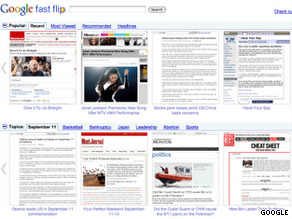
Google's Fast Flip application displays articles as they appear on news or magazine Web sites.

Or what if you're in the market for a new camera? You saw a friend with a credit-card-thin model at a party last weekend. But was that a Canon? A Nikon? A brand you've never heard of?

If you're like many people, you'd turn to the Internet for answers. But you type in "dog breeds" or "digital cameras" into Google and punch enter, and a big list of blue links comes up. You don't see the dog you want. You don't find the camera, either -- at least not quickly.

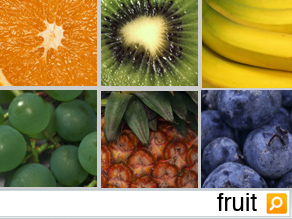
Such quandaries are the driving force behind Bing's new "visual search" function, which lets Web users troll through image catalogues instead of Web pages when they know what something looks like but can't put their finger on the name.

The examples are also evidence that the search engine market, once dominated by simple rectangular search bars and the lists of Web pages that follow, is diversifying. People who once were happy with a one-search-fits-all model are finding exceptions, and a number of niche search products are trying to respond to these increasingly diverse needs.

Also this week, Google introduced a test product called Fast Flip, which takes a retro look at Web design by making online news look like something magazine readers will find familiar.

The company has other news products -- namely Google Reader and Google News -- but is looking for ways to make news content more visual and to share some of the revenue.

The new products come as Microsoft's Bing continues to elbow for more room in an online search market that Google has dominated for years. In June, 65 percent of all Internet searchers were done through Google sites, according to comScore. Microsoft caught only 8.4 percent of searchers in the same period.

Fast Flip, an experimental feature of Google Labs, is a Web application that allows users to scan news articles from 39 print and online publishers, including The New York Times, Newsweek, TechCrunch and Us magazine.

Users can "flip" through a horizontal stream of screen grabs of articles as they appear on the partners' Web sites, with layout, design and images intact. You can click once on a story to enlarge the page; a second click takes you to the partner's site. Users also can browse popular topics (the economy, Taylor Swift) or search for others of their choosing.

Google says the idea behind the new service is to make online news-browsing faster and replicate the reading experience of flipping through a magazine or newspaper.

Unlike Google News, which emphasizes breaking news articles from the past 24 hours, Fast Flip "is more for stories with a longer shelf life," Google spokesman Chris Gaither said.

"We think there's a lot of room for innovation in how people consume news articles on the Web," Gaither said. "The easier it is for people to browse articles quickly, the more they'll read."

Loren Baker, editor of Search Engine Journal, says that increases in bandwidth make "visual search" functions more successful today than in previous years, when images would load more slowly.

Baker believes that Google Fast Flip could make it easier for people to scan news articles on their netbooks, tablets or even smartphones.

"I don't have to sift through my bookmarks. I don't even have to leave Google," he said. "It's almost like a virtual newsstand on my handheld."

But not everyone is excited about Google's new product.

"If this is the future of news, I think news is kind of screwed," said Frederic Lardinois, a writer at ReadWriteWeb, a technology blog. Lardinois said the interface is backward-thinking and is hard to use.

Fast Flip is in a test phase and will incorporate feedback from users, Gaither said. Google also is seeking to expand the roster of Fast Flip partners, he said.

Some tech observers say Bing's hyper-visual search function gives it a new leg up on Google in terms of functionality.

Nova Spivack, a search expert and founder of Twine, said the most important thing about Bing's visual search is that users can sort the images into categories.

By creating different kinds of searches and making them sortable, Bing is catering to high-end Internet users -- which, soon, will be everyone, he said.

"I think Bing has realized that everybody is becoming a search geek," he said.

On the dog-breed search example, users can filter the images to include only terriers, or hypoallergenic dogs or toy dogs, or dogs that need a medium level of exercise, so they don't have to scroll through hundreds of photos to find the dog they're searching for.

Mary Jo Foley, editor of the All About Microsoft blog at ZDNet, said she personally finds Bing's visual search useless because she's not a visually minded person. But she said it's an example of search engines diversifying, and that's a good thing for everyone.

"I think the idea for Microsoft and Google and Yahoo is to present things in new ways and say, 'What if you could do this? Would you want to do it this way?' "

She added: "Not all people search in the same way, and not all people want to get their results in the same way."

There are about 50 galleries of images in the new Bing visual search bin, but more will be added, and eventually the idea will be integrated into the main search site, said Stefan Weitz, director of Bing. Right now, users have to go to a separate page to find the visual searches.

How Search Engine Optimization Can Be Effective For Personal Blogs


People who start a blog usually have one thing in common, they are impatiently waiting for their first visitors to arrive at their new site, and they crave the attention of the crowds. Many bloggers have confessed over their blog pages about their hopes for traffic and media exposure, having their thoughts and posts responded to and republished all over the internet. Even an inexperienced person will feel the excitement of publishing a new post on a blog, and would be disappointed to learn that no one read his or her thoughts by the end of the first day.


A few years ago the web 2.0 revolution was on its way, blogs became one of the easiest and most popular way for many to share their thoughts and ideas with the world, blogs were many times referred to as your own private magazine on the net, only no one knew that much of those blogs will not be visited by anyone, and will serve as personal diaries of those who write them. The fact that so many people started having blogs created vast competition for the topics that were covered in those pages, from radio controlled helicopters to Italian cooking tips bloggers were creating a dense forest of related pages that confused both visitors and search engines robots.

The direct result of the wild expansion of blogs was that search engines started being suspicious about blogs in general, and after a short love affair with blogs search engines wanted to see more commitment from these easy to set up internet pages and their publishers. Today blogs enjoy some of the fruits of that old love affair with the search engines, but are still under close inspection.

The great advantage that blogs offer simple users is the easy set up and the ability to post text or photos (or both) with a few clicks of a button, without any serious understanding or knowledge of code or scripts, the blogs are set on huge networks that enjoy strong linking and many users, the template on which the blogs are published is very appealing to the search engine robots, and the RSS delivers what it promises, really simple syndication for any blog out there.

There are a few things every blogger out there should know and do, these will push and promote the pages of his blog, make a semantic connection between the last post and the ideas it addressed and make it possible and easy for other people to find that text and read it. Once a post is written a blogger needs to insert the keywords and tag the written message, video or photos with the appropriate words it refers to, if this is not done the post is much harder for the robots to package into a few terms. A short description of the post or article, video or photos in the post will make the summary available to searchers without accessing the page, thus contributing to the user experience on the blog. Forget to add a descriptive line and your indexed page will not have much to offer a person browsing the terms you entered as tags, and will have no incentive to visit the blog.

Once posted the blog needs to be pinged, you can search the net for a pinging service that will inform many other sites of your blog and its fresh post, sending out a ping is probably the most important thing a blogger needs to do in search engine optimization terms, if a post is not pinged is stands a much lower chance of attracting any potential readers, and even for a non commercial and personal blog this "light promotion" is needed, after all why writer and post it if no one reads it?

For more Local SEO specialist thoughts and ideas, please visit our search engine optimization blog and our local SEM services site.

Tips on writing a blog


Whether you have to write a short, informal blog or a long formal one, you need to adopt effective writing strategies. Blogs may be considered as systematic attempts to discuss problems, situations, conditions or discussions and simulate thinking or action among individuals and groups, you should follow a systematic plan of writing. The following steps will help in organizing and presenting the blog systematically:
  • Analyze the Topic Purpose: The process of writing an effective blog begins with an objective analysis of the topic that is to be discussed and the objective of writing the blog. In other words, you must possess the answers to these two questions. What do you want to discuss or present in the blog and Why do you want to present it.
  • Determine the scope of the blog: In order to keep the blog precise and to the point, the amount of information gathered should be limited to the moist important and essential facts. This helps in making the blog more effective.
  • Determine the needs of the audience: When a blog is being written, the author must know who will read it. However most of the authors tend to ignore their readers. A blog will be effective only if the author is able to connect his/her purpose withe the interests of the audience. Again answer a set of questions before writing. Who is the audience. How is the blog relevant to the audience. What is in it for the audience. What does the audience expect from the blog. How much background information will the audience need.
  • Gather all the information: Once the topic and the purpose has been analyzed, the scope is defined and the audience has been analyzed, the author is ready to gather the information. The information to be presented must be accurate and relevant.
  • Analyze and Organize the information: Analysis of information involves evaluating the information objective, making comparative analysis of different sets of information for obtaining new ideas, and interpreting facts and figures for their relative importance. Organizing the information involves using an appropriate logical pattern to arrange the information in the blog.
  • Review and revise: Once you have gathered all information and organized, now write out a draft and review and revise it for errors or replacement by better ideas and information.
  • Once the rough draft of the blog has been revised, go ahead and publish your blog. If you have sincerely followed the steps I mentioned above, you will see the difference between this blog and the other blogs that you have already written.

How to Promote Your Blog : Comments


In this crazy world of information promoting your blog has become a nerve wrecking endeavor . We all know the various ways in which you can promote your blog but sometimes it just gets too crowded . Here is a way to tackle blog promotion with the use of comments .
Instructions

Things You'll Need:

  • Browser with good bookmarking capabilities .
  1. Step 1

    Research and lecture !

    Find the blogs in your niche , big or small , and make sure you get a list ready with them . Once you've done that just start browsing and reading . Get an opinion , get to know people .

  2. Step 2

    Create 3 folders in your browser bookmark manager . The folders should be in the lines of :

    New
    Ongoing
    Dead

  3. Step 3

    Start commenting . And bookmark the articles on which you comment . Place the ones that you just commented in 'New' . Place the ones that have already received answers in 'Dead' . And for the comments that sparked a discussion use 'Ongoing' .

    That's it . A simple technique to keep your comments clean with the use of bookmarks .

    Tips & Warnings
    • Do not forget about comments . Make sure you keep them in check and place them in their proper category . Only the 'Dead' articles can be forgotten .
    • Besides this method you could simply create a junk email address and use it for all your commenting needs . Most blogs offer the possibility to subscribe via email to a certain article's comments .
    • And as always : don't spam . Don't comment just to get your link there . Comment only if you truly have something to add to the discussion .
    Resources

How to Promote a Blog in Search Engines

Blogging has become very famous for promotion of businesses. People love to do blogging. Blogging is one of the easiest and wonderful way to express your self, your ideas and thoughts. Blogs can also be very well used for promotion of websites and ultimately to promote the business.
Instructions
  1. Step 1

    Blog promotion help in promotion of business. You can promote your product, services through the blog and these days with the blog promotion people are getting lots of business and an expansion of their business. Now the main term comes that how to promote a blog? Blog promotion is a moderate and an easy way. Initially it was somewhat difficult because people had a less knowledge about blogs and their promotion. These days there are number of sources and strategies through which you can promote your blog.

  2. Step 2

    1. Submit blog in top search engines
    2. Exchange links with other blogs
    3. Submit blog in blog directories

  3. Step 3

    4. Submit blog in general web directories
    5. Submit the blog in blog pinging sites
    6. you can join communities at http://www.mybloglog.com

  4. Step 4

    7. Submit blog in RSS directories
    8. Do commenting on dofollow blogs
    9. Create more blogs on relevant themes and link to your main blog
    10. Do social bookmarking of blog at social bookmarking sites

  5. Step 5

    Blog optimization is also very important in order to get fully benefited. For on page optimization perform keywords analysis, meta tags generation, content optimization, alt tags implementation, W3C validation, sitemap creation, RSS feed etc.

  6. Step 6

    All the above mentioned techniques applied in a proper manner will surely give good hikes to the blog in search engines. This will help you in getting high search engine rankings and visitors on the blog.

  7. Step 7

    Blogs not only help in promotion of business, even you may earn revenues through fully promoted blogs. Revenues can be generated through affiliate links and google adsence. Overall blogs are best of income and business promotion.

High Paying Adsense Keywords for Bloggers!


Adsense is the best Pay Per Click(PPC) advertising program we had.Every bloggers aim is to make some bucks at the end right? For that we read so many sites,articles and books around the web daily.Apart from blending ads,writing good content,Quality and lot more things daily we read on every blog,we need to concentrate more on keywords to get good amount into your pocket.

Keywords are the words that people using on search engines to find their desired stuff.Advertiser will use the same keywords to advertise on sites.Advertisers will buy the keywords with Google to display their ads on sites across who are using Adsense.Finally am saying,ads appearing on your sites will depend on the keywords you’re using in your posts.

If you target using high paid keywords in your posts,then Google will show high paid ads in your site.This way you will get more bucks per click.The formula is simple, High paid keywords target = High you will receive.Finally all you have to Do is,just spend some time to search the high paid keywords on the topic you are writing post.Then try to use those keywords to design your post.

Where to find high paid keywords? Ha,here are some of the best Tools in the market which will tell you the keywords for free.

Best keyword Selection Tools:


  1. Overture Inventory Keyword Selector Tool
  2. WordTracker keyword research tool
  3. Google AdWords Keyword Tool External
  4. Digital Point Keyword Suggestion Tool
  5. Submit Express Keyword Suggestion Tool
  6. Keyword Country free keyword tool


Can you believe there are keywords paying $60 per click.All that depends on how popular and how old is your site to get good paid ads.Targeting keywords is just one of the many ways to increase Adsense revenue.Keep going with what you’re doing now and learn new things day by day.You will definitely achieve your target on the ling run.
Word hard+Keep going+Never loose hopes=Sweet Success :) Happy Blogging!

7 Useful Design Tips for Beginner Blogs

Bloggers and webmasters are always keen and worried about their blog’s design.They tweak the templates,change the colors,adjust the css and positioning and take every possible means to ensure that the blogs looks good in the eyes of the readers. But at some point of time the design and the feel of the blog can be really disturbing if you are committing design mistakes.If you are a beginner and have just started out , here are some useful design tips and suggestions to improve your blog’s design.

#1. Use a Clean and Simple Theme

The first thing you Do after you have started your blog is choose a theme. If your blog is hosted on WordPress or Blogger there are Plenty of themes to choose from. Just Google around for WordPress themes or blogger templates and you can get hundreds of Free themes that you can use in your blog.But before choosing a theme keep in mind that it should be simple and clean.

Do not use a theme with heavy graphics,eye catchy colors or Images. Sure they look ” fascinating ” but after some days they will start distracting your readers attention.If the reader is disturbed by your graphics or other design elements he wont stay in your blog to read your articles.Thus it is recommended to choose a clean and simple theme for your blog.

#2. Use White Background and Black text

How many blogs you have seen use a dark background ? Can you easily read the content or text on a Dark background ? Reading articles on blogs having a dark background can be really difficult at times and is not recommended.

Hence it is always advised to use White or a Light background and Dark or Black text.Users want to read your content and they do not visit your website to see the design skills you have.If you make things difficult for them they wont come back even the second time to read your articles.

#3. Keep the Main Attention on the Content Column

This one is no brainer and should be followed at all costs. You should keep the content column the main focus in your blog. The content column should be wide enough ( e.g 600px ).If you have a two column template keep the content column to the left and the sidebar in the right.
Also do keep in mind that the content should begin immediately after your templates header. SO start the content section as early as possible so that the user need not need to scrool all the way down to read your posts.

#4. Use Minimum Advertisements and Widgets

You should Avoid distractions at all costs.The most disturbing and distracting affair in a Blog is advertisements and widgets. So keep the advertisements to a minimum and if possible do not use them within your content.Using advertisements embedded within content makes it hard to read your article all together and readers may feel disturbed. Result : they will stay away from your blog and go elsewhere.

The same is true in case you are using too much of widgets in your sidebars.Using too many widgets will eventually slow down your blog and above all it takes the focus away from the main juice : your content.use widgets sparingly and use them only when you need them , not because it adds one more functionality in your blog.

#5. Use large Font size and Proper fonts

I have seen many blogs playing with their fonts every now and then and they think it looks “cool”.Believe me nothing can be more irritating than using obtrusive font styles. Choose between the standard fonts like : Arial,Verdana,georgia etc. and the size of your font should be more than 12 px (at least). Using low font sizes to save space is a crazy idea.It creates a very bad impression to your first time visitors.

#6. Avoid horizontal Scrollbars

Nobody will be interested if they have to use a horizontal scrolbar to read your articles and posts.You should take utmost care while designing your blog template so that there aren’t any horizontal scrolbars.The scrolbars may occur in differeent screen resolutions( e.g 800 X 600) which is unavoidable but in all other screen resolutions it is recomended to check and say No to scrolbars.

#7. Have a Unique Logo and favicon

The first thing that comes to a readers mind about any blog is its logo.A good logo creates a solid brand and makes your blog remembered in your readers minds and hearts. So create your own blog logo and make it unique. Don’t just use text to represent your blog’s name.

Similarly you should also try to create a favicon for your blog. A favicon is seen in the browser address bar , in RSS feeds and its again a style element that brings clarity and brand value in your blog.

10 most common SEO mistakes people do

1. Use wrong and misspell keyword for title of your site ==> its not useful and target of your site.

2. Put high keyword club density => against of search point of view.

3. Put too many more keywords in the Meta Keywords tags => Meta keyword tag is not important for major search engines

4. Use Page Cloaking => view user and search engine differ

5. Use Automatic Submission Tools for Submissions =>> it won’t hurt your site.

6. Too many Link Exchange in less time ==> Link exchange with not relevant of your site.

7. Creating Pages Containing Only Graphics => It is against SEO but still pages which are created in graphics are not mistake

8. Creating Hidden Text and Link =>> against SEO

9. Using too many similar doorway pages ==> Duplicate content page.

10. Not using the NOFRAMES ==> not crawl in search engines.